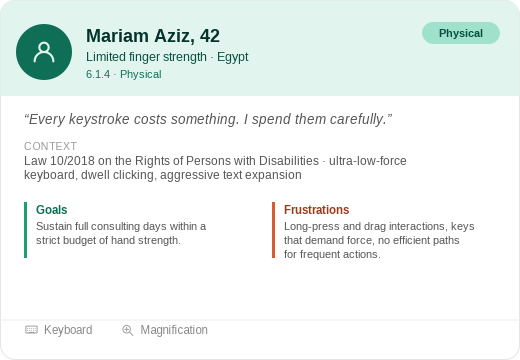
Mariam Aziz
Limited finger strength
Egypt · MENA · 42세
- 관련 법률
- Law 10/2018 on the Rights of PWD
- 서비스
- Digital Egypt
- 메시징
재활보조공학
- Keyboard
- Magnification
Every keystroke costs something. I spend them carefully.
목표
Sustain full consulting days within a strict budget of hand strength.
불편 사항
Long-press and drag interactions, keys that demand force, no efficient paths for frequent actions.
프로필
Mariam Aziz has a progressive muscular disease, leaving her grip and finger pressure very weak. She works as a marketing consultant and has to use a computer all day, but even an ordinary keyboard's key force is taxing. She constantly researches ways to get maximum efficiency from minimal force.
기술 환경
- Keyboard: ultra-low-force membrane keyboard (actuation under 25g)
- Pointing: touchpad, lightweight stylus
- Aids: compression gloves, wrist rest
- Software: auto-click, hover-click features
일상 시나리오
At 9 a.m. Mariam starts working from home. First she stretches her fingers and puts on compression gloves. Checking email takes a lot of typing, and her fingers tire quickly over long sentences.
Mariam relies heavily on text expansion. Typing "ty" expands to "thank you," and "pfa" to "please find attached." She has saved all her frequent phrases as shortcuts.
// Mariam's accessibility profile
const lowForceAccessibility = {
  keyboard: {
    keyRepeatDelay: 2000,   // 2s (very long)
    keyRepeatRate: 40,      // slow repeat
    stickyKeys: true,       // hold modifiers without pressure
    filterKeys: true,       // ignore rapid repeats
    virtualKeyboard: {
      keyPressDelay: 0,         // instant
      hapticFeedback: 'light',
      soundFeedback: true,
      predictiveText: 'aggressive'
    }
  },
  pointer: {
    clickMethod: 'tap-to-click',
    dragMethod: 'tap-and-drag',
    dwellClick: { enabled: true, delay: 1500, showTimer: true },
    gestures: {
      twoFingerTap: 'right-click',
      threeFingerTap: 'middle-click',
      pinchZoom: 'disabled',   // disable strenuous gestures
      rotate: 'disabled'
    }
  },
  voiceInput: {
    activationMethod: 'always-listening',
    confirmationBeep: true,
    showTranscript: true
  }
};
Working on a presentation in the afternoon, Mariam finds precise object selection with the mouse hard. Dragging means holding the button down, which her weak grip often loses. Instead she uses 'click lock': one click latches the mouse button down, another releases it.
Days with video calls are especially hard. Using the laptop trackpad for long hurts her fingers. Mariam connects an external touchpad and works with light touches over a wider area. Frequent functions like screen share and mute she's set to keyboard shortcuts.
과제 및 전략
- Difficulty sustaining pressure: long-press and drag are nearly impossible. Mariam uses settings that replace everything with a tap.
- Fine manipulation: small buttons and sliders are hard. She uses magnification and a large pointer, and prefers keyboard navigation.
- Cumulative fatigue: even short tasks build fatigue fast. She rests often and reduces typing with voice input.
설계 시사점
- Light-touch recognition: interfaces that work with minimal pressure.
- Alternative interactions: toggle instead of long-press, tap-tap instead of drag.
- Efficient input: autocomplete, templates, quick access to frequent items.
- Fatigue-reducing design: minimize repetitive actions, offer batch operations.